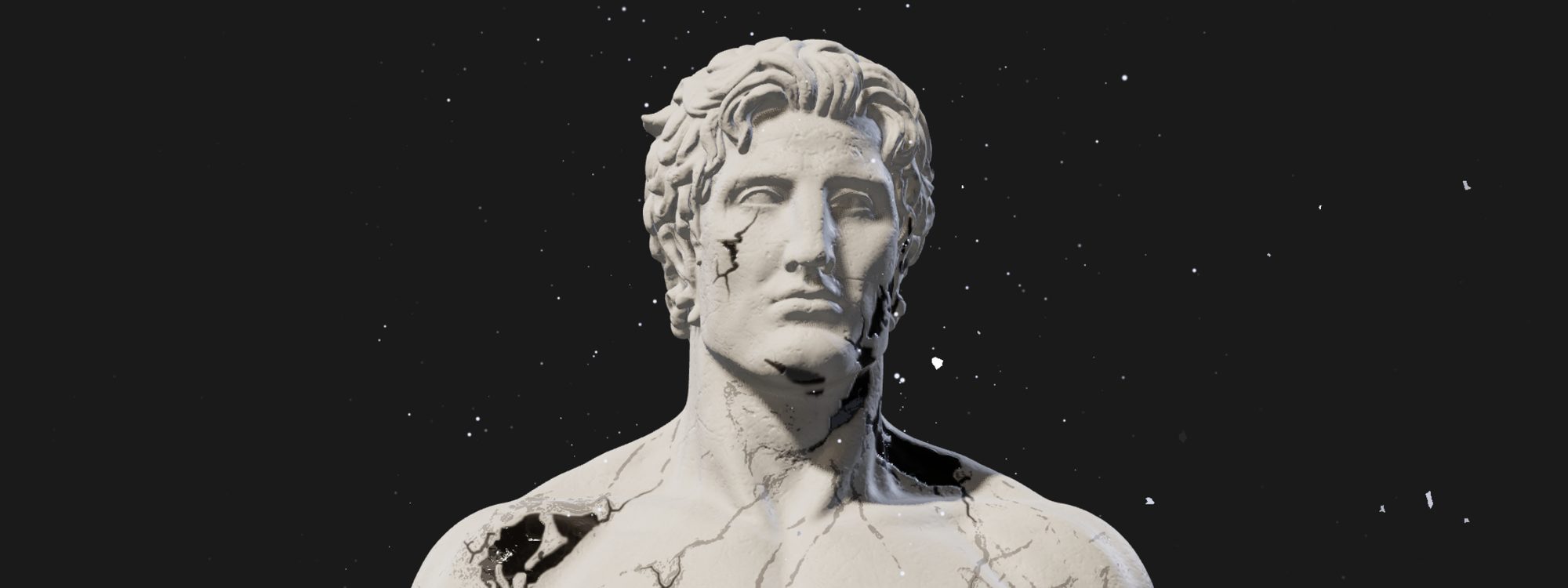
Breaking a statue in real time
Image-to-3D, a vertex-shader rig, traced marble inlays and particles that leak out of the cracks
The hero of this site used to be a flat canvas effect over a photo of a statue. I wanted something closer to the visuals of artists like Anyma: a monumental marble figure that feels physically present. It should turn its head towards your cursor, breathe, catch moving light, and slowly fall apart.
What follows is how that statue was built: where the model came from, how a single rigid mesh learned to move, and the half-dozen attempts it took to make marble cracks that don’t look fake.
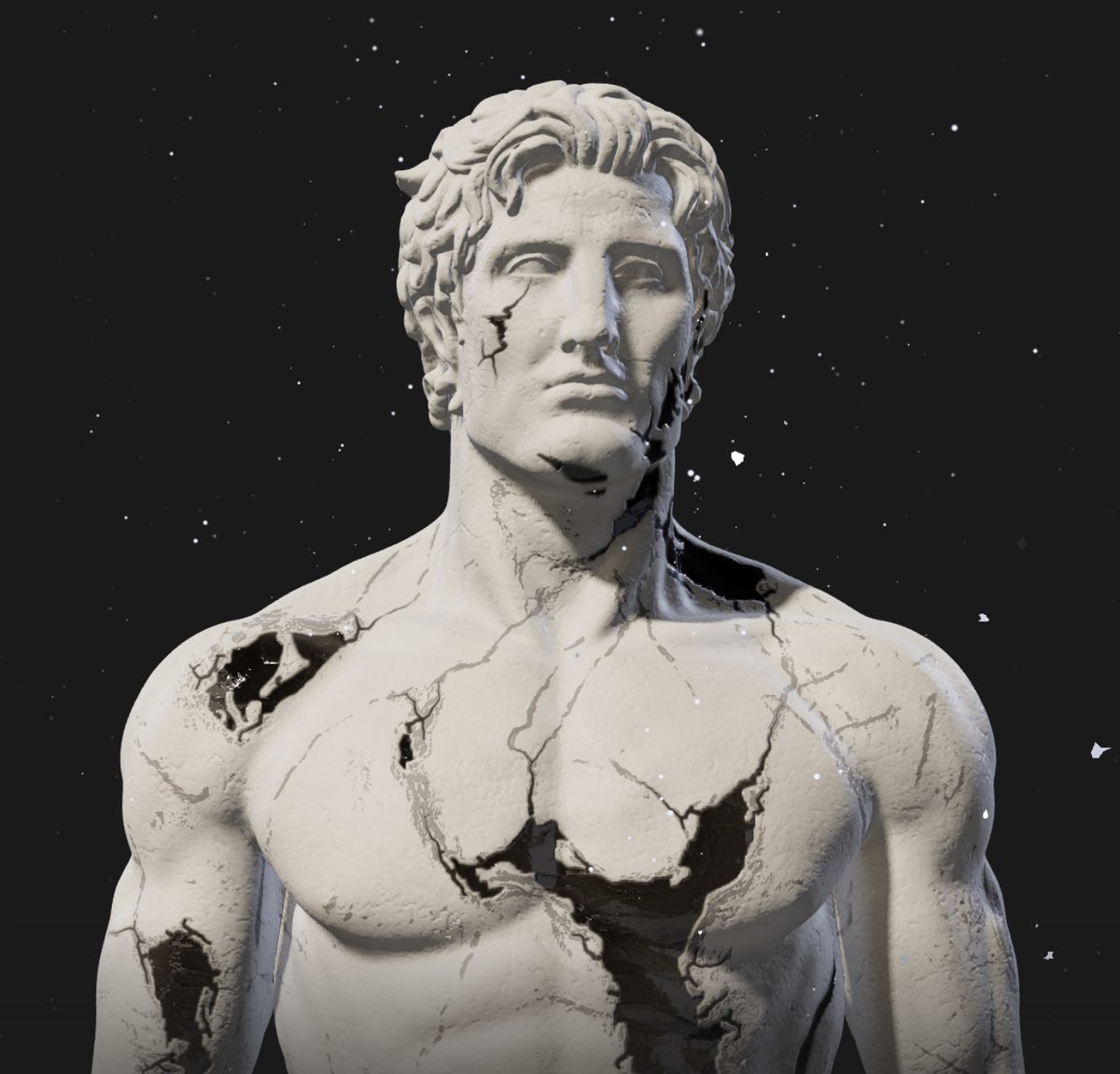
Step one: a statue that doesn’t exist
Public-domain scans of classical busts are easy to find, but they look like museum pieces. I wanted something more modern: a front-facing, idealised figure, waist up. So I generated a concept image and turned that into geometry with TRELLIS.2, Microsoft’s image-to-3D model, driven through its Hugging Face Space with @gradio/client.
Image-to-3D output is impressive at a glance and messy up close. Three problems needed real geometry work, done in Python with trimesh, pymeshlab and libigl:
- Double walls. TRELLIS meshes are thin shells: every surface has an inner twin facing it. That breaks Poisson reconstruction and anything else that expects a closed surface. The fix was a visibility test. For every face I cast 48 cosine-weighted rays over the hemisphere around its normal (Embree via
trimesh). A face is “outer” if at least one ray escapes to open air. Inner-wall faces always hit the opposite wall, so they get dropped. - Seams and bumps. A visible dent around the neck and a few anatomical details I wanted softened were fixed with biharmonic fairing: pin the vertices outside a region, then solve for the inside with
igl.harmonic(V, F, boundary, values, k=2). Because it minimises curvature variation, the patch blends into its surroundings with no visible crease. - Size. The result is normalised to one unit tall, cut at the hips and compressed with meshopt. The whole statue ships as a 965 KB GLB.
Rigging a mesh that has no skeleton
The model is one rigid mesh, with no bones and no weights. Rather than rig it in a DCC tool, it’s “rigged” in the vertex shader. The material’s onBeforeCompile hook injects a deformation that turns the head around a pivot at the base of the neck. The rotation fades out down the neck and away from the shoulders:
const vec3 NECK_PIVOT = vec3(0.0, 0.60, -0.035);

float headWeight(vec3 p) {
  float vertical = smoothstep(0.56, 0.7, p.y);
  float radial = 1.0 - smoothstep(0.11, 0.2, length(p.xz - NECK_PIVOT.xz));
  return vertical * mix(radial, 1.0, smoothstep(0.65, 0.69, p.y));
}

vec3 deformBody(vec3 p) {
  vec3 breathed = p + breathOffset(p);
  return NECK_PIVOT + headRotation(p) * (breathed - NECK_PIVOT);
}
The landmarks (collarbones at 0.58, chin at 0.67) were measured from horizontal cross-sections of the mesh. The same function also rotates the normals, and a customDepthMaterial runs the identical deformation, so the shadows move with the head. Without that, the shadow map would still see the rest pose and the head would cast a frozen shadow.
A breathOffset lifts the chest and shoulders on a 5.5-second cycle with a slow inhale and a slower exhale. The head follows the cursor through a slightly under-damped spring (k = 7, c = 4.6), so it overshoots a touch and settles. That reads as mass rather than as a UI animation. After 3.5 seconds without input, the statue starts looking around on its own.
One gotcha cost real time. meshopt quantises positions to integers and puts the scale and offset on the node transform. Every landmark in the shader is in real units, so the node matrix has to be baked back into float attributes before any of the maths above makes sense.
Light that follows you
The key light is a directional light that drifts with the cursor, so moving the mouse sweeps the shadows across the face and the muscle definition. Cool rim lights from behind separate the silhouette from the background. A few Lightformer panels give the environment reflections something to reflect.
The canvas is transparent so the statue sits directly on the page in both light and dark themes. That ruled out the postprocessing stack: the effect composer dropped the alpha channel and drew a dark rectangle around everything. Tone mapping moved back onto the renderer (ACESFilmicToneMapping), and the postprocessing packages were removed altogether.
Marble, attempt by attempt
Getting the surface right took far more iterations than anything else. The cracks especially had to survive close inspection.
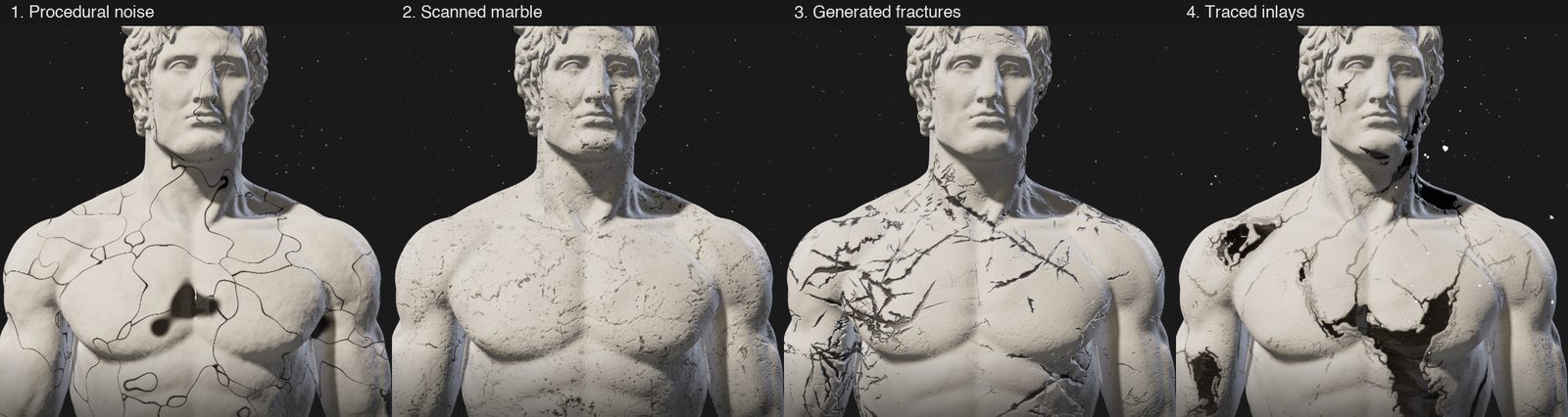
1. Procedural noise. Warped Voronoi cell edges for cracks and FBM for veins. It looked like what it was: a shader. The cells tile too evenly, and the “inlay” blobs had soft, rounded edges that no real fracture has.
2. Scanned marble. The jump in realism came from real data: ambientCG’s Marble019, a CC0 scan of white marble with fine dark cracks. The mesh has no UVs, so the maps are applied triplanar: each texture is projected along the X, Y and Z axes and the three samples are blended by the surface normal. Normals use Ben Golus’s whiteout blend. Everything is sampled on the rest pose position, so the stone stays pinned to the body while the head turns.
Two surprises came with it. The scan’s own normal map was completely flat (a standard deviation of 0.5 out of 255), so I derived a tileable normal map from its height map with wrapped central differences. And at statue scale, the scan’s small dark specks read as moles. Splitting the colour map with connected-component analysis fixed that. Small, round components were inpainted from their surroundings with normalised convolution. Long, elongated ones (by the ratio of major to minor axis) were kept as a separate crack mask.
3. Generated fractures. To get long, straight cracks I generated them. Random walks with very low angular drift and occasional sharp kinks, branching a couple of levels deep, tapering to a point at both ends. They were rasterised into a field where each pixel stores its distance to the nearest crack centre line, divided by the crack’s half-width at that point. Thresholding that field draws cracks of any width with crisp, pointed tips. Thresholding a blurred mask, by contrast, always rounds them into sausages. A Mikkelsen-style bump on the same field sinks each crack into the stone, so its walls catch the moving light.
It was technically nice and artistically too busy. It also didn’t match the concept art, which had a very specific composition: thin grey veins everywhere, and a handful of large, glossy black inlays.
4. Tracing the concept art. So the final version stops inventing cracks and traces them. I rendered an orthographic front view of the statue straight from the decoded GLB. Then I aligned the concept image to it with an affine transform, using scale factors measured from both silhouettes (head width, shoulder span, chin and navel heights).
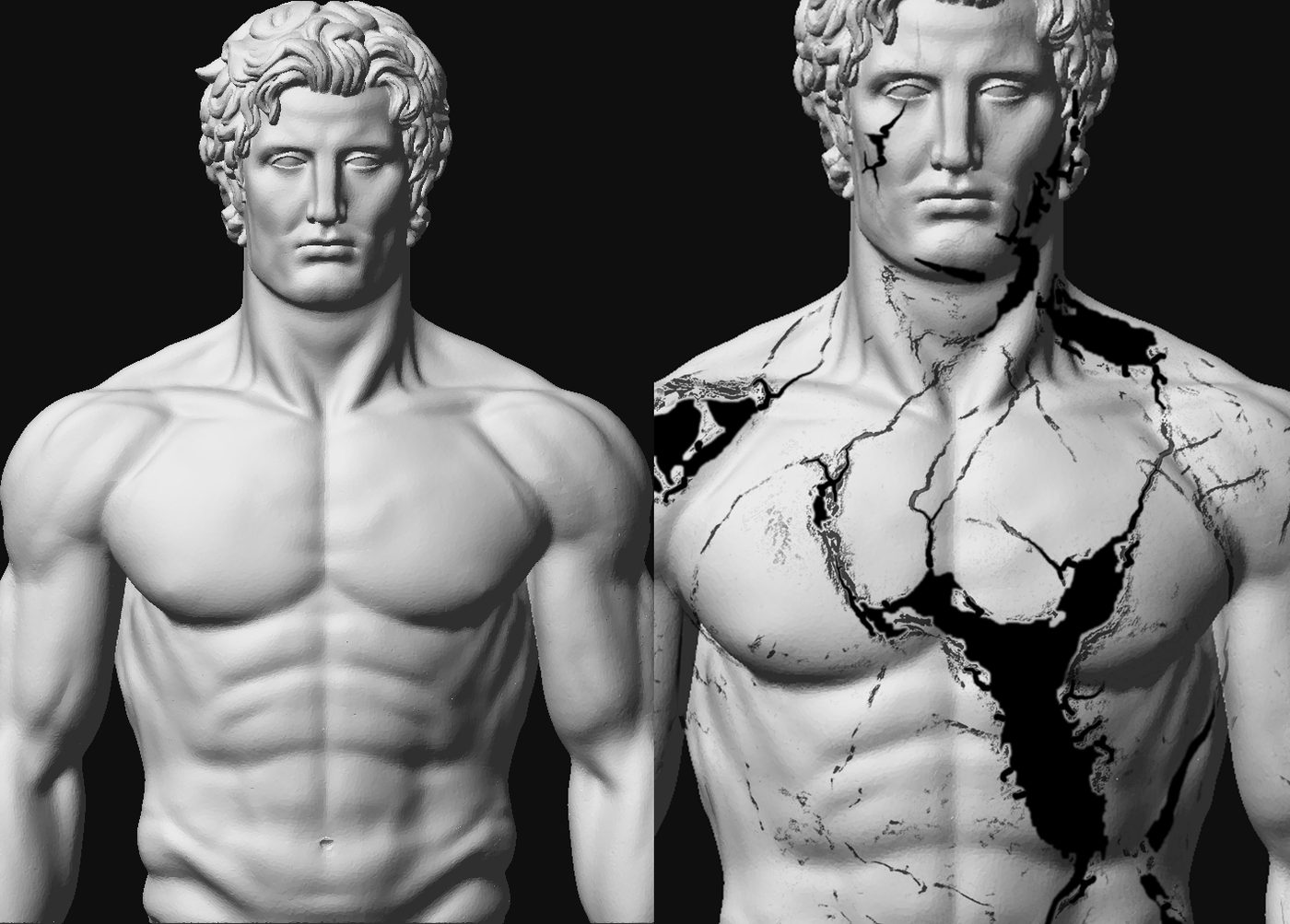
From the aligned image, morphology extracts three masks:
- Inlays. Very dark regions above a minimum area, closed and hole-filled so the glossy highlights inside them count as inlay too. Shading that isn’t inlay, like the eye sockets and the gaps between arm and torso, is removed with a few exclusion boxes.
- Veins. A black top-hat transform: the greyscale closing minus the image. It picks up thin dark lines and ignores broad shading.
- Continuations. Black lines that leave each inlay along its veins. This one needed graph work. I skeletonise the strong veins and prune short spurs. Then I bridge each vein to the nearest point on the inlay edge, and measure geodesic distance along the skeleton with
skimage.graph.MCP_Geometric. The black fades and narrows with that distance. Stretches that only run alongside an inlay are dropped: a continuation has to lead away.
The masks are packed into one RGB texture and projected from the front (u = x + 0.5, v = y), faded out on surfaces that face away. The inlays get their own material response. The fragment shader hooks in after three.js’s lights_physical_fragment chunk and raises clearcoat to 1, clearcoat roughness to 0.03 and specular reflectance, but only inside the inlays. A ridged-noise bump inside them breaks reflections into thin streaks, like lacquer or obsidian.
Particles that leak out of the cracks
There are two particle systems. The background dust sits only behind the statue, with a Gaussian falloff to the sides, so the canvas never reads as a rectangle. It’s drawn with premultiplied “over” blending, so pale specks work on the dark theme and charcoal specks on the light one. A MutationObserver on the site’s data-theme attribute eases the colours across when you switch.
The second system comes out of the cracks themselves, and it needs to know where the cracks are in 3D. A Python script samples mesh vertices where the inlay mask is above 0.7 and the normal faces the camera. It keeps only points on the torso: the head deforms in the vertex shader, so particles placed there would drift off it. Those points are written out as a small typed array. Farthest-point sampling then picks five hotspots, starting at the big chest fissure, so the particles rise in a few legible streams instead of fizzing evenly from every crack.
I prototyped four movements behind a ?particles= URL flag before choosing: a steady drift, bursts synced to the breathing cycle, curling smoke, and tumbling shards. The final version combines the last two.
Smoke follows a curling path that grows with height, with gusts and lulls in its speed. Particles near the cursor are parted in screen space with a Gaussian falloff. To keep it calm, the pointer uniform trails the real cursor slowly, and the effect eases in and out over a couple of seconds:
vec4 stir(vec4 clip) {
  vec2 ndc = clip.xy / clip.w;
  vec2 d = (ndc - uPointer) * vec2(uAspect, 1.0);
  float push = exp(-dot(d, d) / 0.06) * 0.05 * uStir;
  ndc += normalize(d + 1e-5) * push / vec2(uAspect, 1.0);
  clip.xy = ndc * clip.w;
  return clip;
}
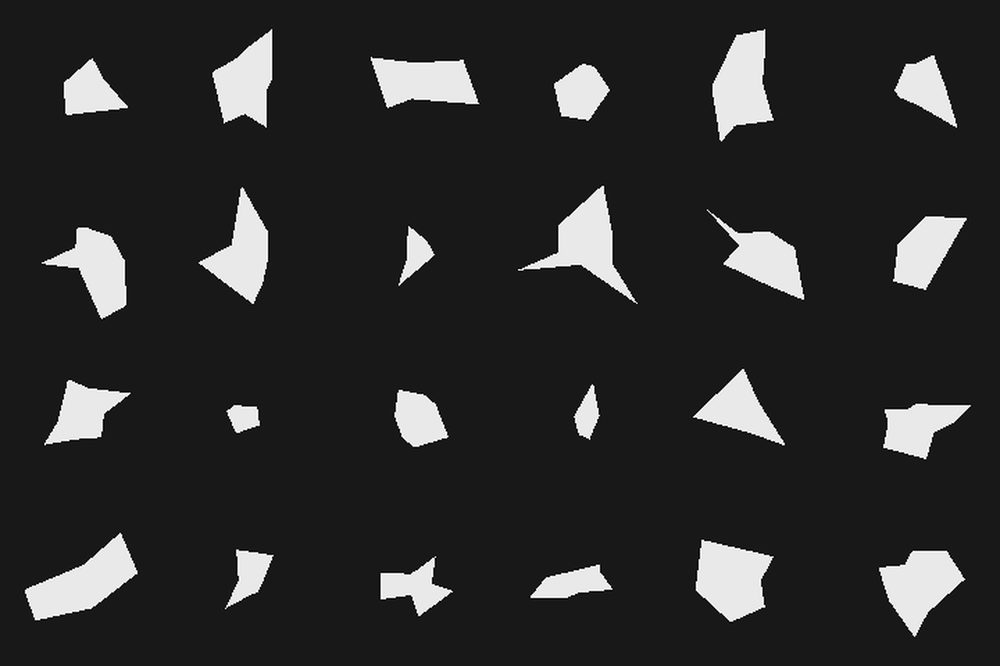
Shards are point sprites, but each one draws its own broken fragment in the fragment shader. Every shard is a star-shaped polygon with 5 to 9 corners at uneven angles and radii, some pulled inwards into notches. For each pixel, the shader finds which angular wedge it falls in and tests it against that wedge’s edge:
for (int j = 0; j < 9; j++) {
  float i = float(j);
  if (i >= corners) break;
  float a0 = (i + 0.85 * (hash1(seed * 5.3 + i) - 0.5)) / corners * TAU;
  float a1 = (i + 1.0 + 0.85 * (hash1(seed * 5.3 + mod(i + 1.0, corners)) - 0.5)) / corners * TAU;
  if (mod(ang - mod(a0, TAU), TAU) < a1 - a0) {
    vec2 e = corner(i + 1.0, corners, seed) - corner(i, corners, seed);
    vec2 d = q - corner(i, corners, seed);
    return e.x * d.y - e.y * d.x >= 0.0;
  }
}
The sprite rotates over time and squashes on one axis as it turns, so a flat flake appears to tumble. A sharp pow(abs(sin(spin)), 10) glint brightens it whenever it faces the light. I iterated on the shapes offline by rendering grids of them with the same maths in NumPy. Linearly interpolating the radius by angle gave rounded pebbles; straight edges between corners gave stone.
Budget and restraint
The whole hero is a React island in Astro, using @react-three/fiber and drei. It costs a 965 KB model and about 3 MB of textures, which I still plan to cut roughly in half. Rendering is capped at a device pixel ratio of 1.75, with soft PCF shadows from a single shadow-casting light. Visitors who set prefers-reduced-motion get a still, lit statue: no breathing, no idle wander and no particles leaking out of the cracks.
The most useful lesson was about where to spend effort. The vertex-shader rig, the light and the particles came together quickly. The material didn’t. Realism came from real data (a scan, a concept image) bent into shape with geometry processing, not from cleverer noise. I built most of this in a long, iterative session with an AI coding agent, which made it cheap to try (and throw away) four crack techniques and four particle movements before settling on what’s here.